Index >> Products >> IP Serial >> I/O Controller xxxx

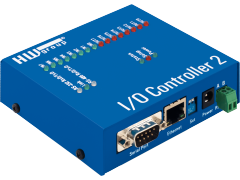
I/O Controller 1204: 12DI, 4DO & Serial RS-232 port over IP

12 inputs for contacts, 4 outputs and a RS-232/485 serial port connected to the Ethernet over IP. I/O Controller 1204 is a terminal server (serial line) with added binary inputs (for contacts) and outputs. M2M communication over TCP/IP using a Telnet-type NVT protocol. The device actively informs about changes at inputs, and supports a TCP Client/Server mode.

Serial port, inputs for contacts and outputs are controlled over a TCP/IP connection using a TELNET-like (RFC2217) M2M protocol. The protocol is compatible with NVT, the extension to 12 inputs is described in the manual. The Hercules SW terminal can be used for testing (supports inputs and outputs).

  • I/O Controller actively notifies about state changes at inputs; if a TCP connection is not active, the device establishes it as a TCP client.
  • The serial port can be connected to via a virtual serial port (e.g. COM27) on your networked PC. The HW VSP application for Windows is supplied free of charge.
  • Control the product from your own application in minutes.
    Make your work easier with many examples for various programming languages in the  HWg SDK (Borland C++ Builder, MS Visual C, VB, Delphi, C#, PHP, JAVA).
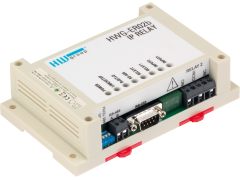
4 output relays, 8 inputs for contacts and a serial port over IP


Photo 1 Photo 2

I/O Controller 1204 Flyer


Basic features

  • RS-232/485 serial port
  • 12 binary inputs for contacts
  • 4 built-in double-throw relays
  • Modes of operation:
    • TCP Server
    • TCP Client/Server
    • UDP (without I/O)
  • Virtual serial port driver for Windows = easily get e.g. COM 5 on your PC
    • The "HW VSP Multi virtual serial port supports up to 100 serial ports on a single PC.
  • Access security can be enhanced with 128-bit authentication (TEA), or by restricting access to the device to a defined IP address range.

Applications

  • Link up to twelve buttons with a SW application.
  • Easily connect a serial printer output to an IP network (LAN / WAN).
  • Control a horn or an alarm signal using the outputs that can be boosted with external relays.

  • Remote control of power and other technology over RS-232 and RS-485
  • Remote control of displays and signal lights
  • Remote reading of the status of PIR sensors, door contacts and security systems
  • Card readers, RFID
  • Vending machines
  • Security systems, alarms
  • Access control systems
  • Barcode scanners


M2M communication

  • TCP/IP Server   [Client -> Server]
    I/O Controller, as a TCP server, listens for incoming TCP connections from a computer (a PC or a server). When the connection is established, data in the internal buffer are transmitted, and then bidirectional communication can take place, similarly to a common "terminal server".
    Binary inputs and outputs can be controlled with a M2M protocol that uses an extension of RFC2217 (NVT support must be enabled).

  • TCP/IP Client/Server    [Server <- Client]
    I/O Controller has received some data into its internal buffer from the serial port (or has detected a change at the binary inputs) and attempts to send it to the server. The unit tries to establish a connection to the specified outgoing IP address and port. If unsuccessful, it waits for about one second in the TCP server mode and then tries to establish the connection again.
    Binary inputs and outputs can be controlled with a M2M protocol that uses an extension of RFC2217 (NVT support must be enabled and the TCP connection must be established).

  • UDP/IP
    Data are sent as UDP packets, without delivery acknowledgement.
    In the UDP mode, the device uses a sophisticated "packetiser" that allows you to specify broad conditions about what should be sent from the serial line to the Ethernet, what should not, and when.
    Binary inputs and outputs cannot be controlled in the UDP mode.

     
  • VSP (Virtual serial port)
    The HW VSP software, when installed on a PC with Windows, creates a virtual serial port (e.g. COM7), and the serial port at the I/O Controller then works as a physical port of your PC.
    Binary inputs and outputs
    can be controlled from HW VSP using the "Binary I/O" tab, as long as NVT support is enabled for both the HW VSP software and the I/O Controller unit.


Download and links

   
  • Software
    • Hercules - configuration (IP address, Telnet setup) and testing utility for Windows
    • HWg IPRC cmd – command-line control of outputs

    • HW VSP - HW Virtual Serial Port for Windows.
      I/O Controller is also supported by the VSP Multi version that allows you to connect up to 64 serial ports to a single PC.
    • Examples in the HWg SDK
      SDK (Software Development Kit) with examples of controlling the I/O Controller is available for download free of charge.

      • EX01: UDP Setup (Borland C++ Builder, MS Visual C, VB, Delphi, C#)
      • EX02: I/O Controller (Borland C++ Builder, MS Visual C, VB, Delphi, C#)
      • EX03: Control Remote Serial Port (Borland C++ Builder, MS Visual C, VB, Delphi, C#)
      • EX13: TCP Setup (Borland C++ Builder, MS Visual C, VB, Delphi, C#)
  • NVT (Network Virtual Terminal) M2M communication protocol
    Note: The extension of the NVT protocol to 12 inputs is described in the product manual.


Ordering and FAQ

    Ask for the price or details:
    NAME:* 
    Company: 
     - Web:  http://
    Email:* 
    Phone: 
    Country: *

    Spam protection. How many is five times six?

  • How can I order a sample?
    We either fulfill your order at HW group in Prague, or we pass it down to our distributor in your country.
    (List of HW group distributors).
  • Where can I find product pricing?
    Ask our distributors, or request a quote (by e-mail or by filling out this form).
  • What is the warranty?
    The standard warranty for this product is 2 years, can be extended upon request.
  • Can I pay by credit card?
    Yes, HW group accepts payments by credit card or wire (bank) transfer. However, your card number needs to be manually written down into a form on the received invoice, which is then faxed back to us.
  • How do you ship?
    We work with several shipping companies, and we use FedEx for express deliveries.
  •  

  • Is it possible to control the outputs and read the inputs over a WEB interface?
    No, I/O Controller products do not have a built-in web server, all communication takes place over a TELNET-like protocol. If you need a Web interface, use our Poseidon or Damocles products.
  • Does I/O Controller inform about changes at inputs, without a need for repeated polling of input states?
    Yes, I/O Controller is an active device; within 200 ms after a change at the inputs, about 7 bytes of NVT status change information are sent to the active TCP connection. When no TCP connection is open, it is established in the TCP Client mode.
  • Can I control the product from my own SW application? Where can I find a description of the protocol?
    Yes, use the HWg-SDK examples or see the description in NVT documentation.


>> Online order form

Ordering numbers


OID Description
600 307
>Quote
I/O Controller 1204
I/O Controller 1204 unit only, no power adapter or cables.
All necessary connectors are included.


More accessories

Similar products

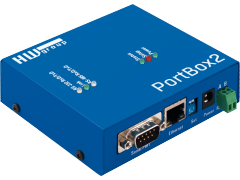
  • PortBox
    Ethernet to RS-232/485 converter, supports Server and Client/Server mode, NVT, TEA authentication, RS-232 "tunneling" over TCP/IP or UDP/IP.
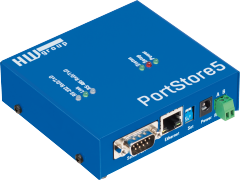
  • PortStore
    Terminal server with a 2 / 32 Mb buffer. Stored data are accessible over an Ethernet network using TCP/IP. Typical applications include replacing a RS-232 printer and making its data available over Ethernet.