|
|||||||||||||
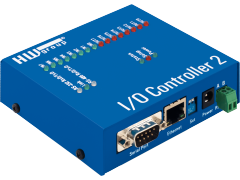
I/O ControllerI/O Controller is a unit containing 8x digital input over ethernet, 8x digital output over ethernet and RS-232/485 serial (Terminal server) interface. All the interfaces are accessible over a network using the M2M (Machine to Machine) protocol on TCP/IP.English version Česká verze Versión española Deutsche Version Version française
- Features - Applications - Download - Topology - Specifications - Device extensions - Software - FaQ & Support - Order - Products
Basic features
Typical applicationsA typical application is remote access to a RS232 or RS485 controlled technology. I/O controller is an ideal device if you need remote digital I/O signalizations (ethernet input, ethernet output), remote relay control, server accessible remote inputs together wirh a RS-232 or RS-485 bus for a bar code reader, display, etc... You can access the device using the HW VSP software, or you can write your own software using our wide examples and source codes library.
|
||||||||||||||||||||||||||||||||||||||||||||||||||||||||||||||||||||||||||||||||||||||||||||||||||||||||||||||||||||||||||
|
![]() |
![]() |
VSP
(Virtual Serial Port)
| Digital Output | |
| + Output type | 8x darlington transistors with common ground |
| + Max. output Voltage | up to DC 50V |
| + Max. output Current | up to 500 mA / 1 pin max. total Power Dissipation = 1W / 1 pin or 2.25W all pins |
| + Inductive loads suppression | 8x integral suppression diodes for inductive loads - COMMON pin |
| + Power up init value | Power up init value is on the output up to 1ms after power-up |
| + SW control | Binary outputs are controlled over NVT protocol through TCP/IP |
| Digital Input | |
| + Input type | Binary optocoupled |
| + Log. 0 voltage | 0 .. 3V |
| + Log. 1 voltage treshold / “on” current | from 5V / 5mA to 20V / 25mA |
| + Max. input Voltage and Current | up to 40V / 50 mA / 1 second |
| + Isolation Voltage | max. 50V to power supply |
| + Sampling period | 10 ms |
| + SW control | Binary inputs are controlled over NVT protocol through TCP/IP |
| Serial port | |
| + Data bits | 7 or 8 or 9 |
| + Stop bits | 1 or 2 |
| + Parity | None / Odd / Even / Mark / Space |
| + Baud rates | 50 .. 115.2 kBd - whole range, step = 50 Bd |
| + Data flow control | XON/XOFF, CTS/RTS, None |
| + Interface | RS-232: 1x DB9M (RxD,TxD,RTS,CTS,GND) - DTE device |
| RS-485: 1x DB9M (A, B) | |
| + Used RS-232 signals | RxD,TxD,RTS,CTS - DSR pin is used for setup mode activaton only |
| + Used RS-232 internal buffer memory | 740 B for incoming data, 740 B for outgoing data |
| Ethernet port | |
| + Interface | RJ45 (10BASE-T) |
| + Compatibility | Ethernet: Version 2.0/IEEE 802.3 |
| + Supported protocols | IP: ARP, TCP + NVT (Network Virtual Terminal) |
| + TCP connection closing | Data - timeout 50s (with support of NVT - ACK/NOP) |
| Environmental conditions | |
| + Operating temperature | 5 – 50 °C |
| + Storage temperature | -10 to 85 °C |
| + Humidity (non-condensing) | 5 to 95 % |
| Physical parameters | |
| + Power supply requirements | 8-24V/ Typically 250 mA DC - barrel (coaxial) power connector, GND on the shield |
| Binary I/O lines connector | - Cannon 37 Female (37-pin
sub-d socket) or - 20 pins on screw terminal strip |
| Functional parameters | |
| + Device SETUP configuration options | RS-232 Setup - over any RS-232 terminal |
| TCP Setup - over TCP/IP - any telnet terminal on the TCP/IP 99 port | |
| UDP Config - network parameters via UDP using the Hercules. | |
| + LED diagnostic | LINK and POWER -LEDs are inside the RJ45 Ethernet connector or LINK LED is next to Ethernet RJ45 connector. |
I/O
Controller's inputs
All 8 digital inputs are optocoupled with common ground on IGND pin.
You need
to connect this pin to the GND pin on your connector. You can also
control the pins using contacts which are connecterd to the POWER pin.
The maximum power drain is 200 mA!
I/O Controller's outputs
Built in RS-485 support
The I/O Controller handles the RS-485
line similary to the PortBox
- Revision 1 device, details can be found in the datasheet,
or in the PortBox
description.
The
following options will either be implemented in the following firmware
version, or in the next device version.
If you
are interested in
any of these modifications, need help implementing them in your
projects, or if you want a specific customer solution, feel free to contact us
The
I/O Controller box can be replaced with a module version, which looks
like a big integrated circuit and can be placed on a printed circuit
board of a customer solution.
The Charon I module contains a similar firmware. Digital inputs/outputs are combined in one 8-bit port. You can use setup to control which pins are outputs and which pins are inputs, or you can set all the pins as output or input.
The Charon I has 24 pins and measures approx. 34x42 mm (2x12 pins with 100 mil diameter). You only need to place a supplied transformer and a RJ45 connector outside the module.
The Charon I module is an ideal
solution for you application if it works with PortBox or I/O
Controller.
Hercules
SETUP Utility
HW
Virtual Serial Port
Borland
C++ communication example
Delphi Charon 1 - NVT communications example
MS
Visual Basic example
Java NVT simple
Code Example
PHP I/O Controller
example
LabVIEW
driver for the I/O Controller
Tom
Boyd from the http://sheepdogsoftware.co.uk
(server for the SW developers and schools) tested IO Controller and
updated our original Delphi application.. (sw screenshot: I/O Controller
Excerciser / SW
download ).
The
NVT (Network
Virtual Terminal) is a complicated protocol when used with a standard
server. In our applications we use only simple fragments of NVT, which
are asy to understand. We use commands in a TCP/IP stream, where every
command starts with a „FF“ character. If you need to transmit the „FF“
character (255 decimal), the transmitter must double it, otherwise the
following data will be considered as a command. Because of this, the
NVT can be turned off, or both sides of the communication must respect
this.
Have you
got any questions regarding this product?
Are you interested in similar products? Please fill in this form and we
will answer your question as soon as possible
Q: How long does it
take to deliver a packet containing the input-change information?
A: This time cannot be exactly
defined over a standard network, because it depends on the network
traffic, etc. But the I/O Controller tries to setup the connection and
send the data as fast as possible according to the network
specifications. Practically it might take 15-25ms to deliver the packet
even on high traffic networks. If the system also tries to set the
output state, the reaction time will be 20-40ms.
Q: Does the I/O
Controller send information to the TCP server about digital input's
change or whether there is any data received over the serial port?
A: Yes, there are two such
situations:
a) A TCP connection is established - A digital
input's change is signalled with a NVT sequence containing a new value
of inputs.
b) A TCP connection is closed - If the device
works in the "TCP Client/Server" it will try to establish a TCP
connection and send the data in a NVT sequence. If if fails
establishing a connection, the inputs change is not buffered or stored.
Q: If I connect 2
I/O Controllers to each other, as described on page 27 in the
datasheet, can I read the inputs from a PC?
A: No, the I/O Controller only
supports one TCP/IP connection at a time.
Q: Can we use one
I/O Controller device from different PC in one network?
A: Yes, but not in one time - You
can connect from PC1, send the command Read/Write values, device
confirm it and you close TCP connection.
It takes around 20ms or deal time, than you can do the same from
another computer. This mesna, that there is limit of One TCP
Connection in one time only.
Q: How to secure
I/O Controller against hackers?
A: You need to spend some time
building up you network's security, the standard is a firewall
separated Ethernet network. The device can be setup to respond only to
requests from a certain IP range, outside this range it wil not answer
even if only pinged. You can also use TEA (Tiny Encription Algorithm)
for client authorisation. If you use TEA, the password is not
transfered via the network.
Q: What is a
packetiser ?
A: Packetiser is a group of
conditions, controlling the RS-232 to Ethernet packets algorithm. In
the TCP/IP mode, the packetizer is controlled only with a "Serial line
timeout" parameter, which defines a length of space after the last
received character before creating and sending a packet.
Q: We want to use
our own software to control the device, are there any SW examples or
libraries?
A: Yes, please look at our Support & Download
page, where you can download many examples for Borland C++
and Delphi.
We even have very simple examples in Visual Basic,
JAVA and PHP.
Q: We need this
device to control a 230V device. Do you have a version with such
outputs?
A: Yes, but regarding to different
power parameters in different countries and price of the
certificationhneeded, we mostly recommend to place the I/O Controller to a DIN
molding together with a relay. You can e-mail us, if you have further
questions.
Q: How does the
RS-232/485 work? Is there a RS-422 version available?
A: Yes, the I/O Controller is
basically an expanded PortBox
(RS-232/485 - Ethernet Converter), You can choose between
RS-232 / RS-485 using the DIP switches. For the RS-422 and external
unit is needed.
Q: The PortBox (RS-232/485 -
Ethernet Converter) can be controlled via the virtual COM
port for Win 2000 and XP. Can this be used for I/O Controller?
A: Yes, you can not only control the
the RS-232 line from the Virtual
COM port, but since version 2.19b also the digital
inputs/outputs.
The products are on stock and we can send them worldwide with FedEx and other couriers. The price can be found in the pricelist. In the Czech republic, you can also order using our eshop - obchod.HW.cz.
I/O Controller set
![]()
- I/O Controller PL [600291] (photo)
- DB9 LapLink cable 2m [600063]
- 1x Power adaptor "wall plug" - [600 080]
You can change the type of the adaptor to UK or USA version, note this in your order- I/O Controller Test board [600032]
8x LED (outputs) and 8x DIP (inputs) on a small PCB - detailed image- Printed datasheet - "I/O Controller "
- CD with documentation, FirmWare versions, testing utilities and other SW
The I/O Controller can be supplied in several versions, according to the bellow described ordering number. If you do not specify a device version in your order, we will send you a prefered type. The delivery terms of the non-prefered types should be verified by phone or requested in your order confirmation.
| OID | Device types |
| 600 292 >Quotation |
I/O Controller PL set (photo) Recommended starting set, it contains: - I/O Controller PL [600291] - 20 pin connector [600 034] - EU Power adaptor [600080] (can be replaced by UK or USA type) - I/O Controller Test board [600032] - DB9 LapLink cable 2m [600063] - Manual, CD |
| 600 291 >Quotation |
I/O Controller PL (photo1, photo2) I/O Controller PL device unit, one set of connectors [600 034] "20 pin connector" attached in package |
| 600 295 |
Wall mounting profile "C" size (photo) |
| 600 301 |
Dual Lock fastener (photo) |
| 600 025 |
DIN Rail box fastener (product photo, aplikace: photo1, photo2) |
| 600 307 >Quotation |
I/O Controller 1204 (photo) Special version of I/O Controller 1204 with 12 Inputs for Dry contacts and only 4 outputs. Terminal connectors included. |
| 600 026 | I/O Controller - Terminal Block version (photo) Industrial version in metal robust box |
| 600 030 | I/O Controller set (picture
of the set) Recommended starting set of industrial version in metal robust box |
| 600 028 | I/O Controller - Cannon 37 (pictures) - (Warning: old type, use another..) |
| 600 027 | I/O Controller - PCB
only (Terminal Block) - (Warning: old type, use another..) |
I/O
Controller
Test board [600 032]
I/O
Controller
DB37F Test board [600 033]
DIN
Relay -
1x switch contact 10 A [600 084]
| Main page | Products | Support & Download | Pricelist | Contacts | SiteMap |