|
Ethernet I/O Controller - APPLICATIONS
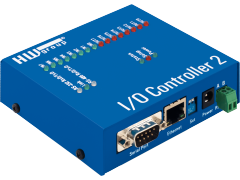
A typical application of the I/O
Controller device is access to a remote RS-232 or RS-485 technology.
I/O Controller is the ideal tool if you require digital outputs, or
need to read digital inputs on your server. Additionally, you can read
any data from your RS-232 line, for example data from a bar code
reader, display, etc.
Typical
applications
RS-232 connection
and 8 + 8 digital I/O signals via Ethernet network
If you need to connect digital signalling (possibly
together with RS-232), then I/O Controller is what you need. You can
see a block diagram of such a connection (Box-2-Box mode) in the
picture below.

Both I/O Controllers are in the TCP
Client/Server mode, connection is initialised by the one
which needs to transfer new data on it's inputs. If you use the "Keep
Connection" function, the connection is held up by sending the NVT NOP
(No Operation) packet every 10 seconds. If this packet is not received
for longer than 50 seconds, the connection is closed and will be opened
again once the network connection is ready.
In case of a power failure, you need to define a
default state of the output register, which will be set when the power
is restored. This state remains unchanged, until the I/O Controller
connects to the other side and synchronizes it's outputs with the other
side's inputs.
RS-232
and I/O pin control via Ethernet network
This case is similar to the one above, but the I/O
Controller sends data to a computer instead of another I/O Controller.
You can connect more computers to one I/O Controller, but only one can
communicate at a same time. For security reasons it might be useful to
define an IP address range which will be accepted by the I/O controller.

Typically you can communicate with a program running
on your computer (for testing purposes you can use the "Test mode" in Hercules
software) which directly supports NVT communication with digital
inputs/outputs.
Hercules is a TCP Client software,
if you wish it to report input changes, you can switch it to TCP
Client/Server as in the previous example. The computer
mentioned here doesn't have to be your PC, it could also be your
network server running an application.
I/O pin control
from your WWW pages or user interface
A typical application can be controlling a remote
machine through a WWW interface. Due to the difficulty of implementing
WWW interface into the I/O Controller, it can be preferable to realise
this by PHP or ASP script running on your server, which can open the
connection to the I/O Controller, read inputs, set outputs and then
show the results on a WWW page. You can see the communication scheme in
the picture below.
This way may seem to be more complicated, but it has
only one disadvantage - you need a running web server, which is very
common in today's industrial systems. The advantages of this solution
are:
- Programmers can create the user interface in PHP or
ASP language, there is no need to learn something new, therefore your
system can be launched in much shorter time.
- The robust server is much more resistant against
hacking or distributed attacks.
- The acquired data can be processed and stored for
example to an SQL database.
- In case of a server failure, the administrator can
still connect to the I/O Controller manually.
- WWW pages can be easily modified with user access
restrictions (some users can modify the data, some can only see them).
- More servers can access the I/O Controller. The
number of users is unlimited, you can apply IP address restrictions.
I/O Controller applications samples
There is a huge amount of possible I/O Controller
applications. For your information, we have chosen some of the
applications realised by our customers.
- Manufacturing
and employee management from the ORACLE server
I/O Controller is connected to an LCD display via the RS-232 line and
the inputs/outputs are connected to 8 backlit buttons. The employee
presses the button with the desired activity (for. example: he wants to
stop production to service a machine). The request is sent as a TCP/IP
packet to the ORACLE server, which allows the activity by backlighting
the pressed button, or denies the request and then sends the reason of
denial to the LCD display.
- Simple
access system
I/O Controller is connected to the contactless id-reader (RS-232).
Whenever an id is read, the packet is sent to the server, which then
opens the door for the employee. By setting up the other digital
outputs, the server can also activate the alarm, or turn off the lights
in the guarded object when the last employee leaves and locks the door.
- Remote
RESET of a locked-up network device
I/O Controller controls a reset switch, or a relay, which can turn the
device off. Operator can reset several devices using a simple PHP
script.
You can connect a UPS control relay, so the system can inform you that
a device had a power failure and is running from battery only. Then you
can use a much cheaper UPS without SNMP monitoring.
- Remote
temperature measurement with the posiibility to turn on heating/cooling
The I/O Controller is connected to a simple RS-232 thermometer, and the
digital inputs are connected to a bimetal heat regulator. digital
outputs control the heating/cooling. The server periodically reads the
temperatures from the RS-232 thermometer, if the temperature exceeds
the given limit, I/O Controller initiates a connection. The operator
can use the digital outputs to perform important service, which cannot
be done automatically.
- Alarm
report from an emergency alarm device
Emergency alarm is conntected to one of the I/O Controller's inputs,
which reports anything unusual to the server by sending a packet. This
is much faster then alert via the phone line.
This is much safer, because the server can always check the alarm
state, therefore you have much higher safety level and lower phone
charges. Of course you can always run both systems in parallel.
- Simple
parking-stand system
One I/O Controllers input is connected to a sensor, which detects
presence of a car in the parking stand. The output can be connected to
a lever, which blocks access to this stand for a certain customer.
The Ethernet connection is very cheap, robust and the system can easily
be implemented into any server. The number of connected parking stands
is practically unlimited. You can use the RS-232 line to connect a
display which can guide the customer to the nearest free parking place.
|