
Index >> Products >> Monitoring >> Poseidon xxxx
Poseidon 3265: IP thermometer with SMS alerts
Poseidon 3265 is web SNMP thermometer with SMS alerts over connected GSM modem. It's solution for temperature and humidity monitoring over GSM (SMS) and LAN (Web, SNMP, E-mail). MS Excel reporting software HWg-PDMS with graphs included for free.
| The Poseidon model 3265 notifies the service of crisis situation (temperature or humidity out of safe range) in several methods. It sends Email or SMS directly to your mobile phone and it connects to your NMS (Network Management Software) over SNMP.
Poseidon 3265 supports up to 5 connected sensors for temperature and humidity monitoring. Each sensor monitors safe range. In case the value exceeds the range (Alarm status) the device notifies service via SNMP trap or Email, or IT administrator via SMS.
The sensors are connected over total wiring length of 10 meters, standard phone cables and RJ11 or RJ12 are suitable
SMS notification of Alarm (temperature or humidity out of safe range) reaches recipient over GSM network even in case of internet failure.
|
|
Features
- Ethernet: RJ45 (10BASE-T)
- WEB: Embedded WEB server / GUI
- Sensors: RJ11 1-Wire (max 6 sensors - Temperature or Humidity probes)
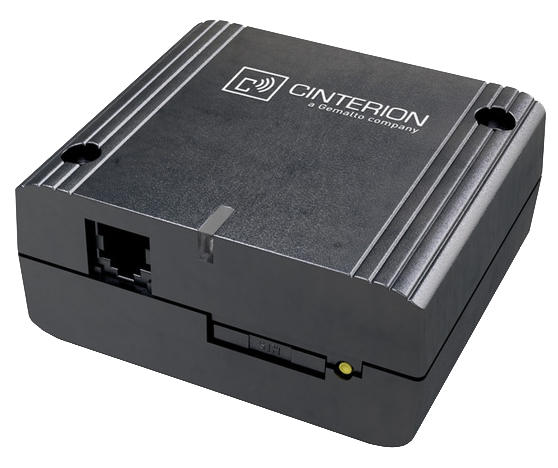
- GSM modem: External, connected over RS-232
- Alerts (value out of defined safe range): SNMP trap, E-mail, SMS via GSM modem
- M2M protocols: SNMP, SNMP Traps, XML
- Physical features: dimensions: 35 x 101.6 x 76.2 [mm]
- Special package: HW group recommends you to order this device in package with GSM modem: Poseidon 3265 GSM2 Tset
- Response to thresholds: SNMP trap, E-mail
- Support for programmers: HWg SDK
- Supported software
- HWg-PD Trigger: Controls other IP devices, redirects alarms to SMS
- HWg-PDMS: Logging, export to MS Excel, reports
- >> Third-party SNMP software
>> Poseidon model XXXX - overview of models
Temperature & Humidity sensors
The sensors total wiring length must not exceed 10 meters. Each sensor monitors value including safe range. The Poseidon notifies of safe range exceeding via sending Email or SNMP trap.
The Poseidon model 3265 supports up to 5 connected sensors.
Compatible sensors
Application
- Monitoring of temperature in server location, independent monitoring over GSM network - notifies of alarm via SMS
- Monitoring of working conditions (temperature and humidity) of ICT technologies (server, safety and phone systems, etc.)
- Monitoring of server rooms, air-conditioned 19“ racks, switch-boards and servers
- Monitoring of back-up power sources, UPS and Diesel engines
- Monitoring and logging of conditions in storage buildings, cold-storage buildings, freezers and fridges (food and pharmacy industry)
- Extended intelligent buildings – air-condition and heating optimalization, long term monitoring of living conditions
- Air-condition working monitoring, monitoring of evaporated water leaking
>> Poseidon - application examples
Topology

- WEB (HTML)
Values and state of sensors are presented on WWW page. The page is automatically reloaded every 5 second. There is a link to Flash Setup from main HTML page, update FirmWare and others
- XML
All sensor's values as well as alarm status information are available from XML files (temper.xml) and any application can log it from XML tags - more information
- SNMP
SNMP is protocol for monitoring of telecommunication devices, network infrastructure and related technology. The Poseidon is fully controllable over SNMP (v1, partially v2) - more information
- Modbus/TCP
Modbus/TCP is industrial standard for input from sensors and output to visualizing and SCADA systems. All values are available over Modbus/TCP - more information
- Alarms
- SNMP Traps
Exceeding value out of "Safe Range", the sensor gets to Alarm status. To notify of this status the device sends SNMP Trap including alarm description to configured IP address - more information
- Email
Exceeding value out of "Safe Range", the sensor gets to Alarm status. To notify of this status the device sends Email including alarm description - more information
- SMS
Exceeding value out of "Safe Range", the sensor gets to Alarm status. If the GSM modem is connected and configured, SMS including sort description is sent to setup phone number.
>> Poseidon –
communication protocols .
HW interface
Overview of all sensors in our assortment: Sensors and accessories
- RS-232
Interface for configuration and GSM modem connecting
- IT Bus (1-Wire)
Inexpensive interface to connect up to 10 temperature sensors over a total distance of maximum 10 meters
>> Interface to connect sensors to Poseidon units
Technical specifications
- Port 1: Ethernet RJ 45 - 10BASE-T / 10 Mbit/s
- Port 2: SENSORS - 1-Wire bus (RJ12)
- Port 3: RS-232 serial port for Serial setup or to connect GSM modem
- Power supply: 12V DC
- Device setup:
- Locally - RS-232 Setup
- UDP Setup
- Over WEB - graphic interface Flash setup
- Over SNMP
| Port 1 - Ethernet port |
|
| + Interface |
RJ45 (10BASE-T) – 10 Mbit or 10/100 Mbit network
compatible |
| + Supported protocols |
IP: ARP, TCP/IP (HTTP, Modbus over TCP), UDP/IP (SNMP) |
| + SNMP compatibility |
Ver:1.00 compatible, some parts of the ver 2.0 implemented |
| |
| Port 2 - 1-Wire sensor bus |
|
| + Connector |
RJ12 (6 pins - 4 pins used only) |
| + Sensors / distance |
model 3265 - max. 5 sensors, up to 10 m total
model 3262 - max. 2 sensors, up to 10 m total |
| |
| Port 3 - RS-232 |
|
| + Connector |
Cannon 9 male (DB9M) |
| + Pinout |
Standard IBM PC (RxD,TxD,RTS,CTS, GND) |
| + Usage |
Serial setup,
GSM modem connection (model 3265 only) |
| + Max distance |
Up to 15 m |
| |
| LED Status indicators |
| + POWER |
Green - power
OK |
| + LINK & Activity |
Yellow- Ethernet
connectivity |
| |
| DIP SWITCH configuration |
| + DIP1 - RS--232 Setup mode |
ON = RS-232 Setup mode
OFF = Run mode |
| + DIP2 - Security |
ON = Security mode - remote configuration
disabled
OFF = Non-Security mode - remote configuration enabled |
| |
| Physical parameters |
|
| + Voltage requirements |
9 - 15V / 250 mA DC
coaxial power connector (barrel),
GND on the shield |
| + Dimensions |
35 x 101.6 x 76.2 [mm] (H x W x D ) |
| + Weight |
150 g |
| |
| Functional parameters |
|
| Device SETUP configuration possibilities |
- RS-232 Setup - over any RS-232 terminal
9600 8N1
- UDP Setup - IP address assign via UDP with using PN
Eye
- TCP Setup - Terminal configuration and sensors management
- WWW Setup - HTTP Flash application
- SNMP (just for some parameters) |
Which software to use
- Configuration: UDP Config - IP address configuration
- Event processing: PD Trigger - reacts to events
- Monitoring and logging: HWg-PDMS - Monitoring software with MS Excel reporting
- Visualization: CapTemp - Process monitoring and control
- Other applications: Third-party SNMP software
- For programmers: HWg-SDK contains interface descriptions and examples of using M2M protocols in several programming languages
PD Trigger application example
With the PD Trigger application for Windows, it is possible to receive alarms (SNMP traps) from an unlimited number of Poseidon products and define conditions and actions based on the originating device and the probe name. For example:
- In case of air conditioning failure in server room A, send a SMS to Peter
- In case of alarm in server room B, send e-mail to Tom
- In case of electricity supply failure anywhere, send SMS to Peter and turn on a warning light at the receptionist's desk

>> Software for the Poseidon family
Sample ordering
-
How long it takes to supply ordered samples?
We keep the Poseidon units permanently on stock and supply them during 24 to 48 hours.
- What guarantee you offer?
Standard is 2 years, it can be extended after agreement.
- Where do I get prices?
From our distributors, or request the price from HW group (Email or form).
- How to find out price of the Poseidon, sensors and accessories for my project?
Email us (see Contacts) or use Demand form. Fill in number of sensors, individual distance and what values exactly you intend to measure. Do not forget to mention what SW you will use for data processing or what you expect from the program. Tell use where you are from, we may recommend you installation company in your surroundings
- Can I pay by a payment card?
Yes but not online. Fill in the online order form, print it out. Write your payment card detail, sign it and fax it to our fax number. The other possibility is to pay via bank transfer.
- How do you supply the order?
We use several transport companies and FedEx for express shipments.
>> How to order products
>> Fill in Online order form
Ordering number
| OID |
Type description |
600 165
|
Poseidon model 3265 (photo) |
600 281
|
Poseidon 3265 Tset (photo)
|
600 313
|
Poseidon 3265 GSM2 Tset (photo)
|
600 312
|
GSM Modemcom G10 (photo) |
Poseidon model 3265 accessories
DB9
ProLong cable 2m [600 064]
Extending communication RS-232 cable to connect GSM modem TG20.
- DB9
LapLink cable 2m [600 063]
Communication RS-232 cable LapLink to connect to PC (Setup and FW update).
Power adapter
- Accessories for the IT bus (1-Wire / RJ12)
Poseidon
T-Box [600
040]
Hub to connect up to 5 sensors over 1-Wire bus (5x RJ12), connecting cable 0,1 m long.
Poseidon
T-Box2 [600
280]
Hub to connect up to 2 sensors over 1-Wire bus (5x RJ12), connecting cable 3 m long.
- Temp-1Wire (temperature sensor )
- Humid-1Wire (humidity sensor )
Keywords
sms temperature alert, alarm thermometer, sms monitoring, temperature snmp sms
gsm environment monitor, computer room, server monitoring, temperature monitor, snmp thermometer with SMS alerts, sms humidity, SNMP, GSM and Web enabled sensor |
Similar and related products
|